With Site plans, Platform plans, Workspace plans, and a growing list of add-ons, it's easy to wonder if you're choosing the right plan or accidentally signing up for something you don't need.
Don't worry, we've got you covered. This guide is designed to demystify the Webflow pricing structure for business owners and decision-makers. We'll walk you through every option, from the Webflow starter plan to enterprise solutions, so you can make an informed choice that fits your budget and business goals.
We'll break down the differences between Site plans, Platform plans, and Workspace plans, explain what you get with each tier, and explore the Webflow eCommerce pricing for those looking to sell online.
By the end of this article, you'll have a crystal-clear understanding of the Webflow monthly cost and feel confident selecting the right plan for your project. Let's make sense of it all, together.
Every Webflow price in this guide was checked against webflow.com/pricing on October 14, 2026. It reflects the plan lineup Webflow introduced on May 13, 2026: the Starter, Basic, and Premium Site plans, plus the Team and Enterprise Platform plans.
How does Webflow's pricing structure work?
Webflow pricing has four parts: Site plans that host one website each, Platform plans that bundle a site, a Workspace, and add-ons in one contract, Workspace plans for the team that builds, and optional add-ons. A simple business site often needs only a Site plan, while teams add a Workspace plan or move to a Platform plan.
Think of Webflow's pricing like building with LEGOs. You have different types of kits for different projects.
First, you have Site plans, which are like the foundation and walls of your house: they put your website online at its own address (a custom domain).
Then, you have Workspace plans, which are like the workshop where you and your team build everything. Platform plans are the boxed set, with the house, the workshop, and extra pieces in one package.
Finally, there are Add-ons, which are special pieces you can add for extra capabilities, like a home security system or a multilingual welcome mat.
Here's a simple breakdown:
- Free plan (Starter): This is your trial run. You can experiment with the Webflow Designer, build a small project, and learn the ropes without spending a dime. Your site will live on a webflow.io subdomain, which is perfect for testing but not for your professional business presence.
- Site plans: These are required once you're ready to go live on a custom domain (like yourcompany.com).
Site plans cover hosting, connect your custom domain, and set your site's limits, such as how much traffic it can handle and how much content it can store in the CMS. There are two main types:- General Site plans: Basic and Premium, for standard websites like blogs, portfolios, and corporate sites.
- eCommerce Site plans: Standard, Plus, and Advanced, specifically for online stores, with features for managing products, payments, and orders.
- Platform plans: Team and Enterprise bundle a site, a Workspace, add-ons, and more into one annual contract. They're for growing teams and large organizations that need publishing workflows, more seats, governance, or custom terms.
- Workspace plans: These plans are all about collaboration and workflow. Each one includes 1 full seat for the owner, and you pay for extra seats as your team grows. They're designed for freelancers, agencies, and in-house teams who build and manage websites. A Workspace is where you organize your projects, invite team members to collaborate, and manage client billing.
- Add-ons: These are optional upgrades that add functionality. Webflow offers add-ons for A/B testing (Optimize), built-in analytics (Analyze), and multilingual sites (Localize), plus extra bandwidth, seats, and AI credits.
A key thing to remember: every Webflow account includes a free Starter Workspace, so a single business site often needs only a Site plan. Teams that build several sites add a paid Workspace plan, and Team and Enterprise include both. If you pay yearly instead of monthly, Webflow says you can save up to 40% on your Webflow monthly cost.
Here's every Webflow Site and Platform plan side by side, so you can compare features and price at a glance before reading the details.
| Feature | Starter | Basic | Premium | Team | Enterprise |
|---|---|---|---|---|---|
| Price, billed yearly | Free | $15/mo | $25/mo | $2,500/mo | Custom |
| Price, billed monthly | Free | $25/mo | $39/mo | No (annual contract) | No (annual contract) |
| Custom domain | No (webflow.io only) | Yes | Yes | Yes | Yes |
| Static pages | 2 | 300 | 300 | 500 | Custom |
| CMS items | 50 | No CMS | 20,000 | 20,000 | Custom |
| CMS Collections | 20 | No CMS | 40 | 100 | Custom |
| Bandwidth | 1 GB/mo | 10 GB/mo | 50 GB/mo, add-ons up to 2.5 TB/mo | Up to 30 TB/yr | Custom |
| Form submissions | 50 per site | Unlimited | Unlimited | Unlimited | Unlimited |
| Site search and form file uploads | No | No | Yes | Yes | Yes |
| CMS API rate limit | 60 requests/min | No CMS | 120 requests/min | 600 requests/min | Custom |
| Seats | Via a Workspace plan | Via a Workspace plan | Via a Workspace plan | 5 full and 5 limited | Custom |
| Localization (Webflow Localize) | No | Paid add-on | Paid add-on | 2 locales included | Custom |
| Publishing workflows and page branching | No | No | No | Yes | Yes |
| SSO, SCIM, and custom roles | No | No | No | No | Yes |
| Hosting uptime | No commitment | Standard agreement | Standard agreement | 99.00% SLA | 99.99% SLA |
| Support | Email, aims to reply within 48 hours | Email, aims to reply within 48 hours | Email, aims to reply within 48 hours | 24/7 priority support | 24/7 priority support and a dedicated account manager |
| Best for | Learning and testing | Simple sites without a CMS | Blogs, content hubs, and marketing sites | Growing teams that need workflows, more seats, and 2 languages | Companies with IT, legal, or procurement requirements |
What do Webflow Site plans include?
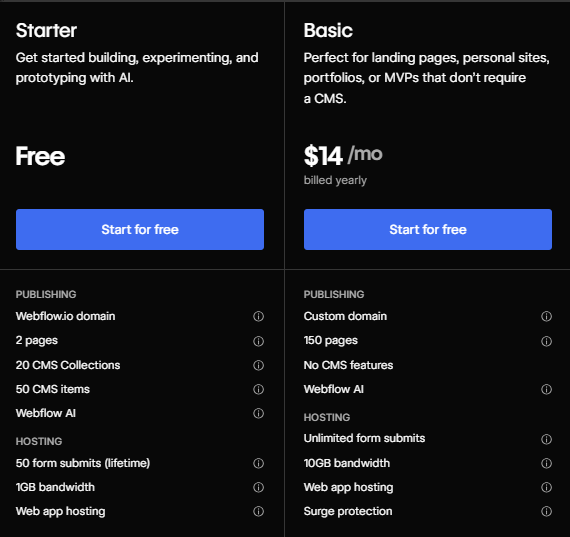
A Webflow Site plan pays for hosting one website: a custom domain, Webflow's global CDN, free SSL, unlimited backups, and the page, CMS, and bandwidth limits of your tier. There are three: Starter (free), Basic ($15 a month billed yearly), and Premium ($25 a month billed yearly).
You'll need a paid Site plan when you move from a webflow.io staging link to your own domain. Basic suits simple sites without a CMS, and Premium covers everything from a small blog to a high-traffic marketing site.
Basic plan
The Basic plan is the entry-level option for launching a simple, static website. It's a good fit for projects that don't need a content management system (CMS), such as a portfolio, a brochure-style site for a small business, or a single landing page for a marketing campaign.
While it doesn't support dynamic content, it gives you access to Webflow's SEO tools, including 301 redirects, customizable meta tags, and sitemap control.
- Price: $15/mo billed yearly or $25/mo billed monthly.
- Key features:
- Connect a custom domain.
- Up to 300 static pages.
- 10 GB bandwidth a month.
- Unlimited form submissions and password protection.
- Webflow Cloud app hosting.
- No CMS items.
Best for: Simple business websites, portfolios, and landing pages that don't need a CMS or dynamic content.
Premium plan
Premium is Webflow's Site plan for content-driven websites: $25 a month billed yearly or $39 billed monthly, per site. On May 13, 2026, Webflow merged its old CMS and Business plans into Premium, so if you're searching for either one, this is the plan you buy today.
It includes the Webflow CMS, so you can create collections of dynamic content (blog posts, team members, case studies, or office locations) and design one template to display each. That makes it the plan for blogs, resource hubs, directories, and marketing sites that publish often.
Bandwidth starts at 50 GB a month, and you can add more in steps up to 2.5 TB. One plan now covers both a small content site and a high-traffic one.
- Price: $25/mo billed yearly or $39/mo billed monthly.
- Key features:
- Everything in Basic.
- 20,000 CMS items and 40 CMS Collections.
- 300 static pages.
- 50 GB bandwidth a month, with add-ons up to 2.5 TB.
- Site search, form file uploads, and code components.
- 120 requests a minute on the content management API.
Here's how the bandwidth add-ons work in practice. In Webflow's own example, a Premium site that uses 500 GB a month pays $199 a month billed yearly: $25 for the plan plus $174 for a +450 GB add-on.
Best for: Blogs, content hubs, and marketing sites of any size that need a CMS.
What are Webflow's Platform plans?
Webflow's Platform plans bundle a site, a Workspace, add-ons, and more into one annual contract. There are two, Team at $2,500 a month and Enterprise at a custom price, and you buy both by contacting Webflow from its pricing page rather than at checkout.
Team plan
The Team plan costs $2,500 a month on an annual contract ($30,000 a year), with no monthly option. Webflow launched it on May 13, 2026, for teams that have outgrown self-serve plans but aren't ready for Enterprise.
- Seats: 5 full seats (design and settings) and 5 limited seats (content editing). More seats cost extra.
- Limits: 20,000 CMS items, 100 CMS Collections, 500 static pages, up to 30 TB of bandwidth a year, and 600 requests a minute on the content management API.
- Included: Webflow Localize with 2 locales, 100,000 AI credits a year, publishing workflows, page branching, single-page publishing, the site activity log, and AEO agents (AEO means answer engine optimization: these agents recommend fixes that help AI search tools read and surface your content).
- Support: 24/7 priority support, guided onboarding, a 99.00% hosting uptime SLA (service level agreement), and a 12-hour response to major incidents.
- Not included: SSO (single sign-on through your company's identity provider), SCIM (automatic user provisioning), and custom roles, which are Enterprise only.
Best for: Growing marketing teams on one main site that need reviews, staging, more seats, and a second language.
Enterprise plan
Enterprise is Webflow's custom plan: an annual contract with no public price, billed by invoice or credit card. It adds what IT and legal teams ask for on top of Team, including SSO, SCIM, custom roles, page-level permissions, audit logs, a 99.99% hosting uptime SLA, and limits set in the contract. For what it includes, how the quote is built, and when you actually need it, read our guide to Webflow Enterprise pricing.
Best for: Companies whose IT, legal, or procurement teams require SSO, a negotiated contract, invoice billing, or custom limits.
Curious how Webflow compares to WordPress? Our in-depth analysis, Webflow vs WordPress 2026, breaks down real-world use cases, performance, and why businesses are choosing Webflow over WordPress. If you've already decided to switch, our WordPress to Webflow migration service handles the full move with zero SEO loss.
What is Webflow eCommerce pricing?
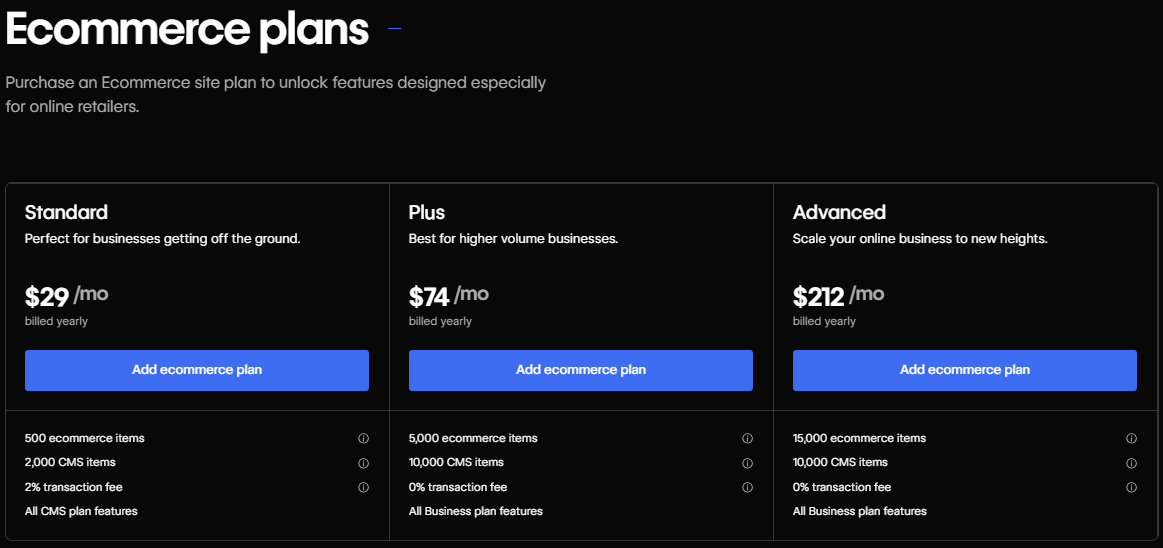
Webflow's eCommerce plans cost $29, $74, or $212 a month billed yearly ($42, $84, or $235 billed monthly) for Standard, Plus, and Advanced. Webflow left these plans unchanged in its May 2026 pricing update.
If your goal is to sell products online, you'll need one of Webflow's eCommerce plans.
These are specialized Site plans that come equipped with the tools to run an online store, from managing inventory and processing payments to customizing your shopping cart and checkout experience.
Every Webflow eCommerce pricing plan also includes the Webflow CMS: 2,000 CMS items on Standard and up to 10,000 on Plus and Advanced.
A huge plus for businesses is that all eCommerce plans support custom checkouts, payment processing through Stripe and PayPal, Apple Pay, automatic tax calculations, and integrations with Meta (Facebook and Instagram), Google Shopping, and Mailchimp. None of them caps your store's sales volume.
Standard plan
The Standard eCommerce plan is designed for new or small businesses just starting their online retail journey. It includes the Webflow CMS, allowing you to run a blog alongside your store.
This plan suits boutiques, creators, or small shops with a limited product catalog. Keep in mind that Webflow charges a 2% transaction fee on top of the standard Stripe or PayPal processing fees.
- Price: $29/mo billed yearly or $42/mo billed monthly.
- Key features:
- Up to 500 ecommerce items (products, variants, and categories).
- 2,000 CMS items and 20 CMS Collections.
- 50 GB bandwidth.
- 2% transaction fee.
- 3 staff accounts.
Best for: Small businesses and startups launching their first online store.
Plus plan
The Plus eCommerce plan is aimed at growing businesses with a larger inventory and higher sales volume. It gives you more capacity for products, content, and staff accounts.
A significant advantage of this plan is the removal of Webflow's transaction fee, which means you only pay the payment processor's fee. This can lead to substantial savings as your sales grow.
- Price: $74/mo billed yearly or $84/mo billed monthly.
- Key features:
- Up to 5,000 ecommerce items.
- Up to 10,000 CMS items and 40 CMS Collections.
- 100 GB bandwidth.
- 0% transaction fee.
- 10 staff accounts.
- Unbranded emails for a more professional look.
Best for: Growing online stores and medium-sized businesses.
Advanced plan
The Advanced eCommerce plan is Webflow's largest store plan, built for established, high-volume online stores.
It offers the highest product limit and the most staff accounts, which makes it the right choice for large catalogs and bigger teams running the store.
- Price: $212/mo billed yearly or $235/mo billed monthly.
- Key features:
- Up to 15,000 ecommerce items.
- Up to 10,000 CMS items and 40 CMS Collections.
- 100 GB bandwidth.
- 0% transaction fee.
- Unbranded emails.
- 15 staff accounts.
Best for: Large-scale eCommerce businesses and established brands with high sales volumes.
How do Webflow Workspace plans work?
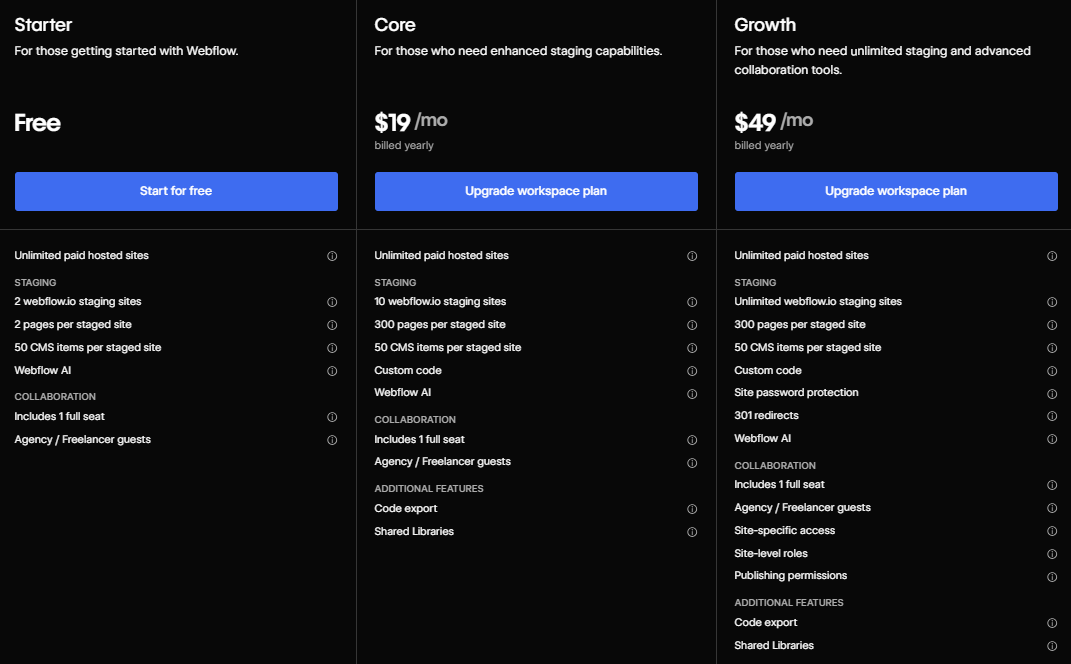
A Workspace plan pays for the people and staging space you build with, not for hosting. Every account gets a free Starter Workspace, and paid plans start at $19 a month for in-house teams (Core) or $16 a month for freelancers, billed yearly, each with 1 full seat included.
A Workspace is your command center in Webflow, where you can manage multiple projects, collaborate with colleagues or clients, and control permissions.
Every Workspace plan includes 1 full seat for the owner. Extra seats cost $39 a month for a full seat (design and settings) or $15 a month for a limited seat (content editing), billed yearly ($45 and $19 billed monthly). Free seats for reviewers and commenters cost nothing.
For example, an in-house team of 3 designers on Core pays $19 for the plan plus 2 extra full seats at $39 each, so $97 a month billed yearly.
Each plan also includes monthly AI credits for Webflow AI: 200 on Starter, 300 on Core and Freelancer, and 400 on Growth and Agency. Another 2,000 credits a month cost $20, billed yearly.
Webflow divides Workspaces into two categories: one for In-House Teams (building sites for your own company) and another for Freelancers & Agencies (building sites for clients).
Workspace plans for in-house teams
These plans are tailored for companies that manage their own web presence internally.
- Starter (free): This is the default plan you get when you sign up. It includes 1 full seat and 2 staging sites on webflow.io, each with up to 2 pages and 50 CMS items. It's great for learning, but you can't export code.
- Core ($19/mo billed yearly, $28/mo billed monthly): Designed for small teams, this plan gives you 10 staging sites with up to 300 pages each, plus custom code, code export, and Shared Libraries. It's a solid starting point for a professional team.
- Growth ($49/mo billed yearly, $60/mo billed monthly): For growing teams, this plan allows unlimited staging sites and adds site-level roles, site-specific access, and publishing permissions, so you control exactly who can publish changes.
- Team and Enterprise: These Platform plans include a Workspace, so you don't buy one separately. Team comes with 10 seats (5 full and 5 limited), and Enterprise seats are set in the contract.
Workspace plans for freelancers & agencies
These plans are built with client work in mind, focusing on features that make project management and client handoffs easier.
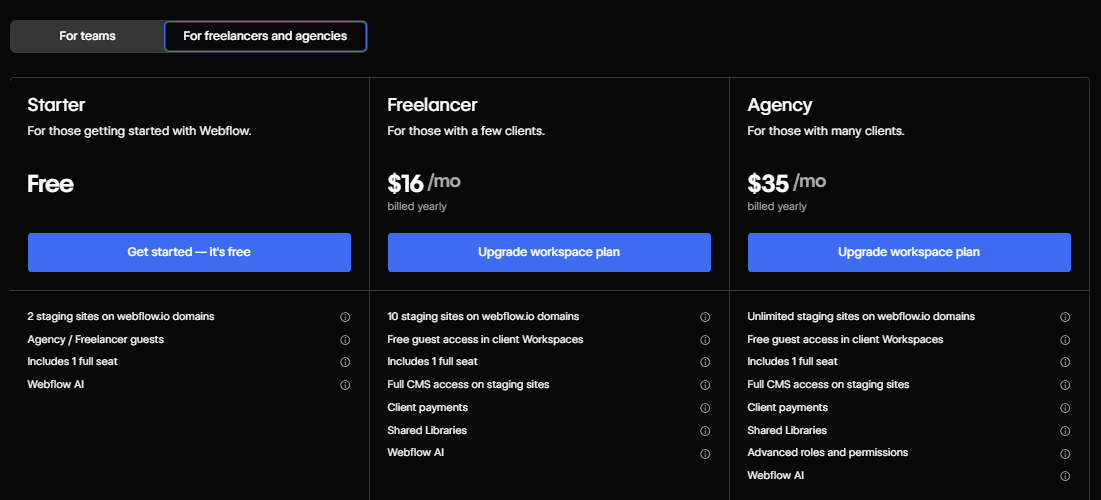
- Starter (free): Just like the in-house version, this is a free plan with 1 full seat and 2 staging sites for exploring Webflow, plus 1 free client seat per paid site.
- Freelancer ($16/mo billed yearly, $24/mo billed monthly): This plan suits solo designers and small studios. It includes 10 staging sites and full CMS access on staging sites, so you can build out a complete, dynamic site for a client before they even purchase a hosting plan. You also get free guest access in client Workspaces, 1 free client seat per site, client payments, and Shared Libraries.
- Agency ($35/mo billed yearly, $42/mo billed monthly): Tailored for established agencies, this plan adds unlimited staging sites, 3 free client seats per site, unlimited Shared Libraries, site-level roles, and publishing permissions, so you can manage publishing rights across many client projects.
What's the difference between Webflow's Site plans and Workspace plans?
Site plans pay for hosting one live website, while Workspace plans pay for your team's seats, staging sites, and collaboration tools. Platform plans (Team and Enterprise) bundle both in one contract.
If you want to publish a site on a custom domain, you'll need a paid Site plan.
Workspace plans control how many seats you have, how many staging sites you can build, advanced permissions, and code export.
In many real-world use cases, especially for agencies or teams, you'll need both: a Workspace for your team and a Site plan for each live site. A business owner with one site can often stay on the free Starter Workspace.
This design lets businesses scale by paying for hosting per site and paying separately for team seats.
What are Webflow's optional add-ons?
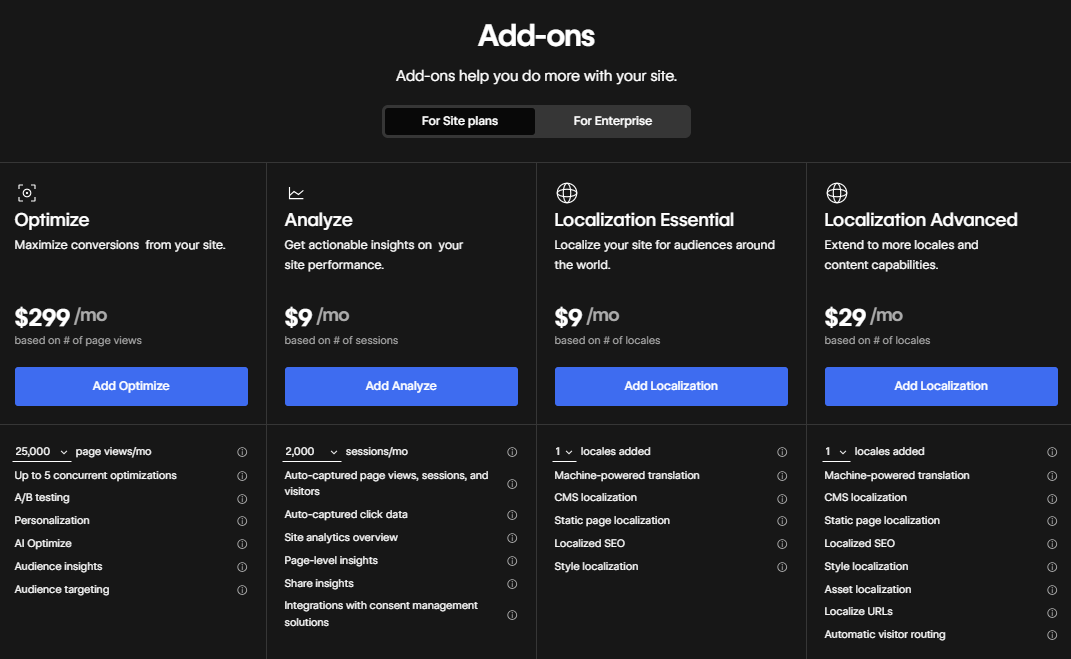
Webflow's main add-ons are Optimize for A/B testing (from $299 a month), Analyze for site analytics (from $9 a month), and Localize for translation (from $9 a month per locale), all billed yearly. You can also buy extra bandwidth, seats, and AI credits.
These tools are built into Webflow, so they work inside your project without a third-party setup.
On Premium, bandwidth add-ons raise your monthly limit in steps, from +50 GB for $20 a month billed yearly ($30 billed monthly) up to 2.5 TB in total. If a site stays over its bandwidth limit for two billing months in a row, Webflow upgrades the plan or add-on automatically, which it calls surge protection.
Webflow removed CMS item add-ons in May 2026, because Premium now includes 20,000 CMS items. For Enterprise sites, bandwidth, CMS items, and other limits are set in the contract.
You should consider these add-ons if your site regularly gets close to its bandwidth limit, if you want to test what converts better, or if you publish in more than one language.
Note: On eCommerce plans, Webflow's pricing page lists Optimize and Localize as optional add-ons. Analyze isn't listed for eCommerce plans.
Webflow Optimize add-on
Webflow Optimize lets you run A/B tests and personalize website experiences directly within the platform. You can test different headlines, images, or calls-to-action to see what converts best, all without writing a single line of code.
You can also create personalized content for different visitor segments, such as showing a special offer to first-time visitors.
- Price: From $299/mo billed yearly ($379/mo billed monthly) for up to 25,000 page views a month, rising with traffic (for example, $549/mo billed yearly for 100,000 page views). It allows up to 5 concurrent A/B tests and personalization campaigns. Optimize Enterprise, for sites with 1 million+ page views a year, allows unlimited concurrent optimizations and is priced by Webflow's sales team.
Webflow Analyze add-on
Webflow Analyze provides built-in analytics right inside your dashboard. It gives you a clear view of your site's performance, including page views, sessions, visitors, click data, and page-level insights, without the complexity of setting up Google Analytics.
It also shows AEO insights, such as your visibility in AI tools (LLM visibility) and AI agent traffic, and it integrates with consent management tools.
- Price: From $9/mo billed yearly ($12/mo billed monthly) for up to 2,000 sessions a month, scaling with traffic. For example, 10,000 sessions cost $29/mo and 100,000 sessions cost $149/mo, billed yearly.
Webflow Localize add-on
Webflow Localize lets you create and manage multiple language versions of your site from one place, which matters as soon as you sell to more than one market.
You can translate static pages and CMS items with AI-powered translation, and localize styles, SEO titles, and descriptions. It also handles the technical SEO for multilingual sites, like a localized sitemap with hreflang tags (the tags that tell search engines which language version to show).
- Essential ($9/mo per locale billed yearly, $12/mo billed monthly): Good for basic needs, allowing up to 3 locales and 10,000 translated words per locale each month.
- Advanced ($29/mo per locale billed yearly, $35/mo billed monthly): Adds asset localization (e.g., different images for different regions), localized URLs, and automatic visitor routing. It supports up to 10 locales and 50,000 translated words per locale each month.
- Enterprise (custom pricing): For a custom number of locales, priced by Webflow's sales team. The Team plan includes 2 locales.
You can preview Localize for free on any plan and pay only when you're ready to publish.
Want to learn more about Webflow? Our complete guide, What is Webflow, covers its features, capabilities, and why it's the top choice for businesses and teams looking to build, launch, and scale websites efficiently.
If you're still weighing Webflow against other platforms before committing, see our side-by-side breakdowns: Webflow vs Wix for design control and ease of use, Webflow vs Squarespace for creative agencies and small businesses, and Webflow vs Framer if you're choosing between modern visual builders.
Which Webflow plan is right for me?
Most business websites need Premium, simple sites without a CMS need Basic, and online stores need an eCommerce plan. Teams that need publishing workflows, more seats, or a second language should look at Team, and companies whose IT team requires SSO need Enterprise.
Choosing the right Webflow plan for you comes down to two factors:
1. Who you are (freelancer, business, agency, enterprise team)
2. What your website needs to do (simple site, content-heavy build, eCommerce, high traffic, collaboration, etc.)
To make things simple, here's a clear plan-matching guide based on real-world use cases:
| User Type | Project Type | Recommended Webflow Plan |
|---|---|---|
| Freelancer / Solo Creative | Personal website or portfolio | Free Starter plan or Basic Site plan |
| Freelancer / Web Designer | Client websites (simple marketing site) | Freelancer Workspace + Basic or Premium Site plan |
| Freelancer / Web Developer | Client websites (content-heavy, blog, resources) | Freelancer Workspace + Premium Site plan |
| Small Business Owner | Simple company website (informational) | Basic Site plan |
| Small Business Owner | Blog, content hub, or SEO-driven site | Premium Site plan |
| Small Business Owner | Small online store | Standard eCommerce plan |
| Growing Business | High-traffic marketing website | Premium Site plan with bandwidth add-ons |
| Growing Business | Scaling online store | Plus eCommerce plan |
| Startup / Scale-Up | Marketing site that needs room to grow | Premium Site plan, or Team when you need publishing workflows and more seats |
| Startup / SaaS Team | Multi-role collaboration, rapid publishing | Growth Workspace + Premium Site plan, or Team |
| Enterprise Team | Large-scale marketing website with governance needs | Enterprise |
| Enterprise Team | High-volume eCommerce with custom workflows | Advanced eCommerce plan or Enterprise |
| Small Agency | Delivering multiple client projects | Agency Workspace + relevant Site plans |
| Mid-Large Agency | Team collaboration, permissions, code control | Agency Workspace with extra seats + relevant Site plans |
How does billing work, monthly vs annual, and can I save by paying yearly?
Yes, paying yearly saves up to 40% on Webflow's self-serve plans. The Basic plan is $15/month billed yearly versus $25/month monthly, and the Premium plan is $25/month yearly versus $39/month monthly.
Workspace plans follow the same pattern: Core is $19/month yearly versus $28/month monthly, and Growth is $49/month yearly versus $60/month monthly. Team and Enterprise have no monthly option, because both are annual contracts.
Basic, Premium, and Workspace plans are paid by credit card, while Enterprise can also be paid by invoice. If you cancel a Site or Workspace plan, you still pay for the rest of the term you signed up for.
Choosing annual billing is typically more cost-effective if you plan to run the site long-term, while monthly billing gives more flexibility to scale quickly.
If you're an existing customer, the new prices apply at your next renewal or billable change, such as switching plans or billing cycles. That started on June 29, 2026 for most sites. For sites in Freelancer or Agency Workspaces, or on legacy pricing from 2022 or earlier, it starts on November 16, 2026, and switching from monthly to yearly billing before then locks in your current plan for one more year.
What's the true cost of running a Webflow site beyond the plan?
The Webflow subscription is usually the smallest part of the budget. Design, development, migration, and ongoing updates cost more than the plan, and seats and add-ons grow with your team and traffic.
Working with a Webflow development agency can simplify the process, ensure best practices, and reduce costly mistakes.
Maintenance is another factor. Even though Webflow handles hosting, a growing Premium site may need bandwidth add-ons once it passes 50 GB a month.
Team collaboration adds cost as well. Each Workspace plan includes 1 full seat, and every extra full seat costs $39 a month billed yearly, so Workspace costs rise as your team grows.
Finally, you can export a site's code from Webflow on any paid Workspace plan, but CMS content has to be exported collection by collection, and forms stop working. Partnering with an experienced Webflow agency ensures migration or scaling happens efficiently without surprises.
Creative Corner specializes in designing, building, maintaining, and optimizing Webflow sites for businesses like yours.
Need to know what hiring a professional Webflow team costs end to end? At Creative Corner, website projects start at $12,000 with a fixed scope and a fixed price, and every project gets a fixed quote within 48 hours. Prepaid hours for ongoing work start at $2,400 a month, and our Webflow maintenance subscription costs $4,900, $7,600, or $9,900 a month. See our fixed-price Webflow plans, which cover migration, design, and ongoing CMS support.
Is Webflow worth the cost? Final verdict
The answer is a clear yes. Webflow is worth it for businesses that demand a professional, scalable, and flexible website without sacrificing design, performance, or growth potential.
We wouldn't be one of the best Webflow agencies if we didn't believe Webflow makes building websites smarter, faster, and better.
It pairs an intuitive visual designer with a flexible CMS, full eCommerce capabilities, and enterprise-level hosting, giving you the freedom to create anything, from sleek landing pages to complex content-driven sites or high-volume online stores, without compromise.
While it may cost more upfront than basic website builders, Webflow consolidates multiple tools into one platform, cuts down development time, and delivers long-term value.
Your site can scale effortlessly, stay fully customizable, and be maintained efficiently, all under one roof.
For businesses that value control, speed, and design freedom, Webflow is not just a website builder, it's a professional-grade solution that grows with your ambitions and future-proofs your digital presence.
Deciding on the right Webflow pricing plan comes down to understanding your specific needs.
Are you building a simple portfolio, a content-heavy blog, or a full-fledged online store? Is it just you, or are you part of a collaborative team?
Webflow's tiered structure, from the free Starter plan to Team and Enterprise, ensures there's a path for everyone, from hobbyists to enterprise-level organizations.
Frequently asked questions
How much does Webflow cost?
Webflow's Starter plan is free. Paid Site plans cost $15 a month for Basic and $25 a month for Premium, billed yearly ($25 and $39 billed monthly). eCommerce plans start at $29 a month billed yearly, the Team plan costs $2,500 a month on an annual contract, and Enterprise is priced by quote. Paid Workspace plans for in-house teams start at $19 a month billed yearly ($16 for freelancers), and paying yearly saves up to 40%.
Is Webflow a one-time purchase or subscription?
Webflow is a subscription, not a one-time purchase. You pay monthly or yearly for a Site plan to host each live website (from $15 a month billed yearly) and, if your team needs more than the free Starter Workspace, a paid Workspace plan (from $16 a month billed yearly). The Team and Enterprise plans bundle both into one annual contract. Hosting, free SSL, a global CDN, and backups are included in the Site plan, so you don't pay extra for those.
What's the difference between Webflow's free and paid plans?
Webflow's free Starter plan publishes your site on a webflow.io subdomain with 2 static pages, 50 CMS items, 1 GB of bandwidth, and 50 form submissions, and you can't connect a custom domain. Paid Site plans (from $15 a month billed yearly) connect a custom domain, remove the Webflow badge, raise page and bandwidth limits, and allow unlimited form submissions. Code export comes with a paid Workspace plan, not a Site plan. A paid Site plan is required for any professional or business website.
Is Webflow cheaper than WordPress?
It depends on what you count. WordPress itself is free, but you pay separately for hosting ($10 to $50 a month), themes, plugins, security, backups, and developer maintenance. A Webflow Site plan costs $15 a month for Basic or $25 a month for Premium, billed yearly, and includes hosting, SSL, a global CDN, and backups. Long-term, Webflow is usually cheaper because you avoid plugin licenses and developer time. WordPress only wins if you have technical skills and use entirely free tools.
Can I switch or upgrade my Webflow plan later?
Yes. Webflow lets you upgrade a Site plan any time, and you can also downgrade or switch between monthly and yearly billing, which Webflow treats as a billable change. If you cancel, you still pay for the rest of the term you signed up for. To move to the Team plan, you contact Webflow from its pricing page. Moving to Enterprise means transferring the site into an Enterprise Workspace, which takes a live site offline briefly until you reconnect the domain and republish.